DEXPI Studio - A desktop application for DEXPI P&IDs
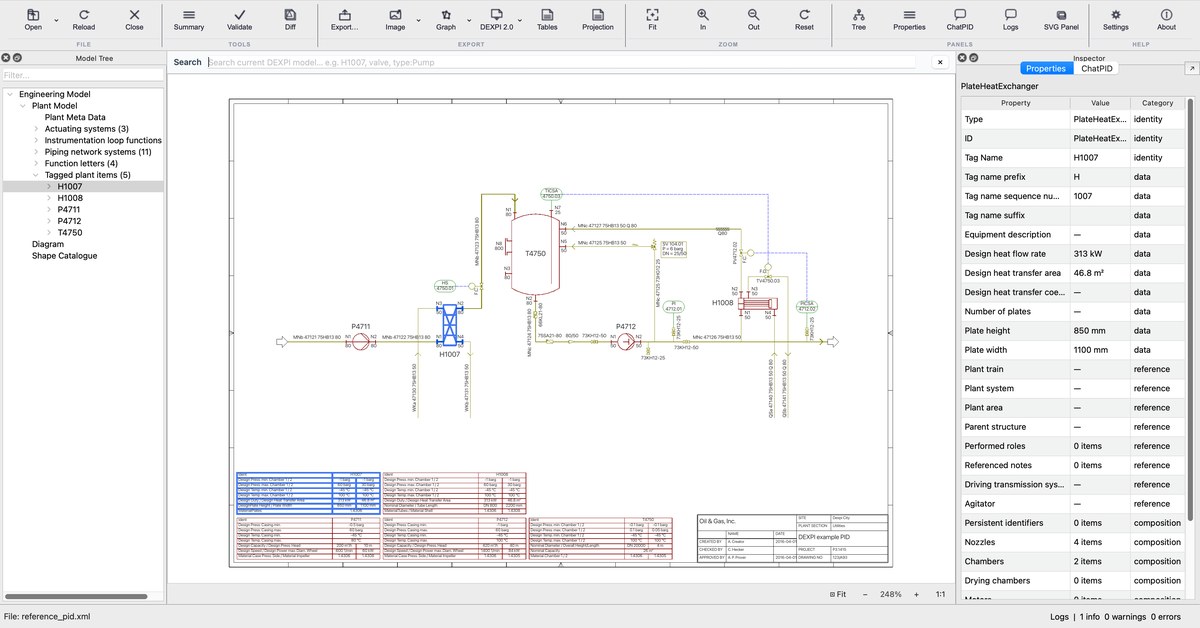
DEXPI Studio is a free desktop application for working with machine-readable Piping and Instrumentation Diagrams (P&IDs) in the DEXPI standard. Open a DEXPI file, see the drawing, inspect every object, validate the model, compare revisions and export the data, without writing code. It runs on Windows, macOS and Linux and is built on our open-source Python library pyDEXPI. Version 0.1.1 was released in November 2026.
Download
DEXPI Studio 0.1.1 is ready to run; no Python installation is needed. Download the file for your system, unzip it and start DEXPI Studio:
Please note two limits of the current version:
- macOS: Apple silicon only. The Mac version runs on Macs with an M-series chip (M1 or later), not on Intel Macs. On an Intel Mac, you can run DEXPI Studio from its source code.
- Not code-signed yet. Windows and macOS will warn you on the first start. On Windows, choose More info and then Run anyway. On macOS, right-click the app and choose Open; if macOS still refuses, open System Settings → Privacy & Security and choose Open Anyway.
Checksums and all releases are on the releases page. Each download includes the DEXPI reference P&ID to try it with.
Features
- Open DEXPI models: DEXPI 2.0 and 2.0.1 files in XML and JSON, and Proteus XML (DEXPI 1.3).
- See the P&ID: the drawing is rendered from the model. Zoom and pan with a mouse or a touchpad, and select an object in the drawing or the model tree to see all its properties, with units.
- Validate: every file is checked as it opens. An Issues panel lists what could not be read and where the model breaks DEXPI's requirements or pyDEXPI's conventions; select an issue to see the objects involved in the drawing.
- Summarize: counts of equipment, piping and instruments, and their tags.
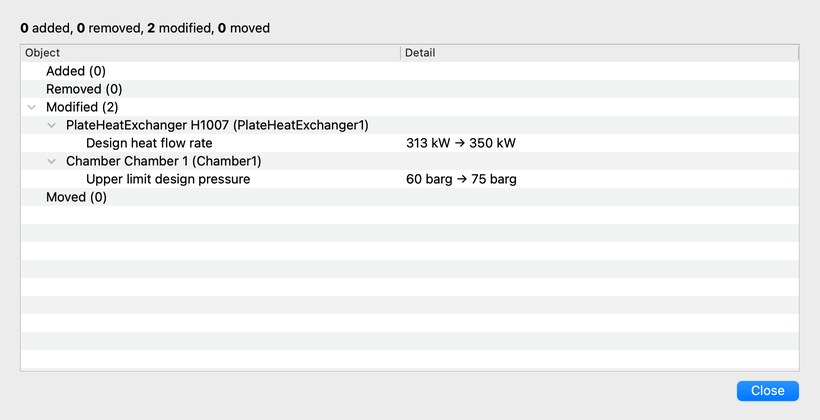
- Compare revisions: see what changed between two versions of a P&ID, for example a design pressure from 60 to 75 barg.
- Export the data for other tools: equipment, line, instrument, piping component and valve lists as Excel, CSV or JSON (in English, German, Dutch or Chinese); graphs as GraphML, Neo4j CSV or text for large language models; images as SVG, PNG or PDF; DEXPI 2.0.1 XML and JSON; and a stable text form for reviewing model changes in Git.
Open source
DEXPI Studio is free software under the GNU Affero General Public License v3. The source code is on GitHub. It is a thin graphical interface: everything it does with a model, from loading and drawing to validation and export, is done by pyDEXPI, so the same functions are available in Python.
Your files stay on your computer: DEXPI Studio does not upload them and collects no usage data. The optional ChatP&ID assistant is the exception. If you set it up with an AI provider of your choice, it sends your question and the model content you select to that provider.
Citation
If you use DEXPI Studio in your work, please cite pyDEXPI:
@InProceedings{pyDEXPI,
  author    = {Goldstein, Dominik P. and Schulze Balhorn, Lukas and Alimin, Achmad Anggawirya and Schweidtmann, Artur M.},
  booktitle = {Proceedings of the 35th European Symposium on Computer Aided Process Engineering (ESCAPE35)},
  title     = {pyDEXPI:{A} {Python} framework for piping and instrumentation diagrams using the {DEXPI} information model},
  year      = {2025},
  address   = {Ghent, Belgium},
  month     = {July},
  doi       = {https://doi.org/10.69997/sct.139043},
}